- EN
- CN

-
Smart Pet Care
Most pets spend the majority of the day alone. Smart pet care hardware closes that gap — giving owners visibility, control, and a meaningful way to stay connected with their animals regardless of where they are. Videostrong develops the AI hardware at the center of this category: cameras with on-device computer vision, autonomous interaction devices, and wearable health sensors. We work with pet brands and retailers to build differentiated products on proven platforms, shortening time-to-market while protecting your IP.
-
Remote Pet Care & Monitoring
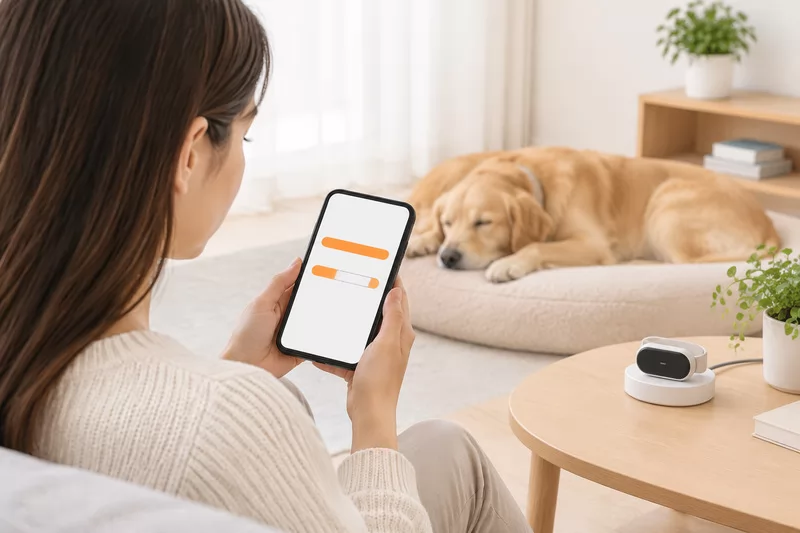
Owners want to see their pet, speak to them, and do something useful from a distance — dispense a treat, activate a camera pan, get an alert when the dog is barking. Remote pet care hardware bundles HD camera, two-way audio, AI-driven motion and sound detection, and treat dispensing into a single connected device. We develop these platforms with local AI inference so alerts fire in real time without cloud latency, and design them for brand customization across enclosure, app, and cloud backend.
-
Pet Interaction & Enrichment
Bored pets develop anxiety, destructive behavior, and health problems. Enrichment devices solve this by providing unpredictable, engaging stimulation even when the owner is absent. Our hardware platform supports autonomous movement, randomized laser path generation, AI-based pet detection to activate play sequences, and integration with owner-controlled mobile apps. These devices are designed for continuous operation, easy cleaning, and the kind of reliable behavior that builds brand reputation in a category where reviews drive everything.
-
Pet Health & Activity Tracking
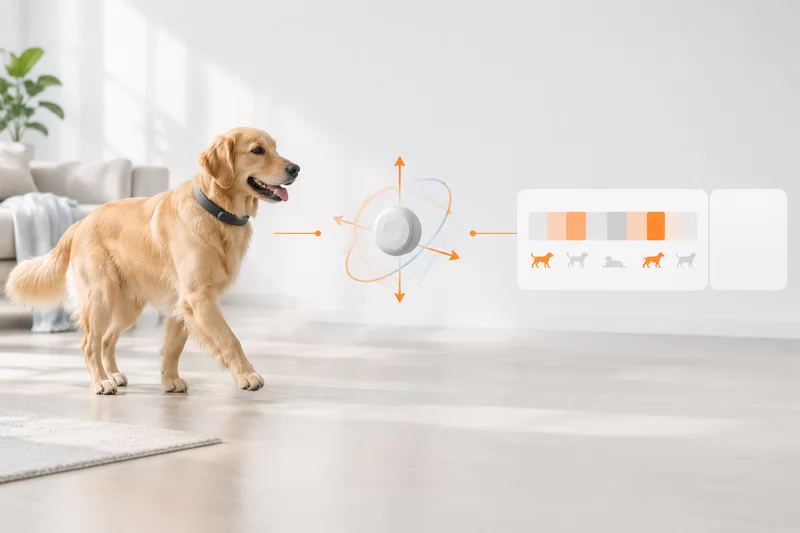
Understanding a pet's health requires data collected across the full day, not just a snapshot at the vet. Wearable health trackers give owners and veterinarians continuous insight — activity levels, rest quality, location, and early anomaly signals. We develop pet wearables with the sensor fusion, power optimization, and mechanical durability that this category demands: compact form factors comfortable for cats and dogs, multi-day battery life, and certified connectivity. Custom firmware enables branded health algorithms and integrates directly with veterinary practice management or consumer wellness platforms.
AI Companion RobotWe provide advanced AI-powered companion robot solutions for global brands, startups, retailers, and technology companies. By combining AI technologies including GPT/LLM integration, voice AI, computer vision, motion control algorithms, edge AI computing, and intelligent interaction systems, we help customers rapidly develop and commercialize next-generation AI companion robot products.
-
AI Pet Robot
Videostrong's AI pet robot OEM/ODM platform is built for brands and companies developing the next generation of intelligent robotic pets. Our hardware and software stack combines large language model (LLM) integration for natural conversation, computer vision for real-time environment and owner recognition, autonomous movement with precise motion control, and expressive interaction capabilities — all packaged for efficient mass production.
Whether you're launching a consumer robotic pet, an emotionally responsive AI companion animal, or an interactive enrichment device, we provide the full development path: mechanical design, AI firmware, mobile app integration, and scaled manufacturing. Products are fully customizable in appearance, personality, and interaction behavior, with your brand identity protected throughout. -
AI Companion Robot
Videostrong's AI companion robot OEM/ODM solutions are designed for brands bringing emotionally intelligent, conversational robots to home, eldercare, and social wellness markets. Our platform integrates LLM-powered natural language conversation, emotion recognition, facial response, voice AI, and touch interaction — creating robots capable of forming genuine connections with users of all ages.
We work with consumer electronics brands, healthcare device companies, and senior care operators to develop companion robots that are intuitive to use, reliable over time, and meaningful in everyday life. The full OEM/ODM process — from product concept and UI/UX design to firmware development and global mass production — is handled end-to-end by Videostrong. -
Robotics Technologies
Videostrong's robotics ODM technology stack provides brands and product teams with a fully integrated, production-ready foundation for building AI-powered robots. The stack spans every layer of development: low-level hardware drivers, chassis and motion control algorithms, AI interaction systems (LLM, voice, vision), IoT cloud connectivity, and application-level deployment infrastructure.
Rather than building each layer from scratch, our customers inherit years of robotics engineering refined through mass production of intelligent terminal products. This dramatically reduces development cycles, lowers integration risk, and frees engineering resources to focus on product differentiation. The stack is modular and customizable — brands can adopt specific layers or the full system depending on their existing capabilities and roadmap.
Smart Elderly CareThe fastest growing segment of companion device adoption is elderly care — driven by aging demographics, the preference for aging at home, and families who cannot be physically present at all times. AI companion hardware for elderly users must meet a higher bar: reliable without internet dependency, simple enough for users who didn't grow up with smartphones, and safe enough that families trust it with their most vulnerable members. Videostrong develops hardware across three pillars of elderly care: daily companionship and cognitive engagement, health monitoring and medication management, and safety systems that detect falls and emergencies before they escalate. We work with healthcare device brands, senior living operators, insurance companies, and telecom carriers who serve the 65+ demographic.
-
Aging-at-Home Companionship
Loneliness is a clinical health risk for elderly adults, equivalent in impact to smoking 15 cigarettes a day. An AI companion that checks in consistently, holds meaningful conversations, plays memory games, reminds someone to take their medication, and makes it easy to call family addresses this directly. We build these devices with voice-first design for users who find touchscreens difficult, cognitive accessibility features, large clear displays, and durable builds that withstand the real environment of an elderly person's home. The platform supports telehealth integration and can be white-labeled for home care agencies, senior living operators, and government elder care programs.
-
Health & Chronic Disease Management
Managing hypertension, diabetes, or heart disease at home requires consistent measurement, accurate medication adherence, and a clear line of communication to care providers. AI health management hardware brings this together: scheduled medication reminders with voice confirmation, integrated peripheral device support for blood pressure cuffs and glucose meters, automatic health data logging, and direct telehealth video consultation. We develop these platforms to medical-grade reliability standards, with clear audit trails for healthcare compliance, family caregiver dashboards, and alert escalation workflows. Custom integrations are available for regional health record systems and insurance reimbursement platforms.
Connected Home PlatformThe home is where all four domains of companion experience converge — pet care cameras connect to the same network as the family display and the elderly safety system. A connected home platform turns isolated devices into a coherent ecosystem, and the AI hardware running at its center determines how well that ecosystem works. Videostrong develops the hardware platforms that anchor connected home experiences: voice-controlled smart home hubs, ambient home vision systems that provide awareness without surveillance, and the AI-powered set-top and streaming devices that define the living room screen experience. This category also carries our established business in IPTV and digital media — evolved and red around AI-first interaction and smart home integration.
-
Smart Home Control & Voice Hub
The voice hub sits at the center of the smart home — the device that understands natural language requests and translates them into actions across lights, locks, thermostats, cameras, and the growing ecosystem of Matter-compatible devices. We develop AI voice hub hardware with on-device wake word detection, cloud LLM integration for complex multi-step commands, and wide protocol support across Matter, Zigbee, Z-Wave, and Wi-Fi. The platform supports custom wake words, branded voice personas, and ISP or smart home platform whitelabeling. For telecom operators managing CPE fleets, we provide remote management integration and OTA update infrastructure.
-
Home Vision & Awareness
Home vision hardware has moved beyond security alerts into ambient awareness — knowing when the kids got home, whether the dog is inside, if a package arrived, or when an elderly parent has been unusually still. We build AI vision platforms with on-device inference that handles person classification, pet detection, familiar face recognition, and behavioral pattern analysis without sending sensitive video to the cloud. Privacy-preserving architecture is a selling point in this category, not a compliance checkbox. The hardware platform supports both indoor and outdoor form factors, local NVR integration, and encrypted cloud backup for customers who want it — with granular data retention and deletion controls built in.
-
TV & Screen Experiences
The television remains the center of the living room, and the device powering it increasingly determines the quality of the whole home entertainment and companionship experience. We bring 14 years of set-top box and IPTV hardware expertise into an AI-first product generation: voice-navigated content discovery, LLM-powered universal search across streaming services, ambient display modes for family photos and information, and companion app integration that lets the TV function as a family communication center. Our platforms run Android TV and custom AOSP builds, support 4K/8K output, and are certified for major streaming DRM schemes. For IPTV operators, we provide headend integration, conditional access, and middleware compatibility across the platforms we've spent over a decade deploying globally.
-
Remote Pet Care & Monitoring
-
Products AI Companion Robots
AI companion robots designed for emotional connection, not just automation. Videostrong develops and manufactures pet, family and elderly companion robots — combining LLM conversation, computer vision, voice interaction and precision motion control. As a one-stop OEM/ODM partner with 14+ years of mass-production experience, we take your concept from industrial design to global delivery.
-
Pet Companion Robots
Keep pets active, watched and connected when owners aren't home. Our AI pet companion robots feature pet recognition, autonomous tracking and obstacle avoidance, interactive play modes, treat dispensing and two-way HD video. Fully customizable for brands entering the fast-growing pet-tech market.
-
Family Companion Robots
A friendly presence for the whole household. Family companion robots bring LLM-powered natural conversation, face recognition and auto-follow, family video calls, storytelling and smart-home control into daily life. Built for brands targeting home entertainment, children's education and family interaction.
-
Elderly Companion Robots
So aging parents are never truly alone. Elderly companion robots combine one-touch video calling, medication and health reminders, chronic-disease data tracking, fall detection and 24/7 safety monitoring — with an interface designed for seniors. A ready platform for elderly-care brands and healthcare providers.
AI Companion DevicesThe ecosystem around the companion. AI companion devices extend your product line beyond the robot itself — smart pet wearables, interactive toys, AI speakers and smart displays that keep users engaged daily. Lower development cost, faster time to market, and a natural upsell path for existing customers.
-
Smart Speakers & Displays
Voice-first companion hubs for the connected home. Our AI smart speakers and smart displays support far-field voice pickup, LLM chat assistants, video calling, smart-home control and Google certification. Available as reference designs or fully customized hardware for operators and consumer brands.
-
Smart Pet Devices
Explore Videostrong’s smart pet devices, including pet GPS trackers, smart collars and pet balls, for pet tracking, everyday care and play. We support brands and retailers with product solutions, R&D and ODM customization tailored to their target markets and use cases, helping them develop new pet tech products or upgrade existing ones.
AI Hardware PlatformThe intelligence beneath every companion product. Our AI hardware platform layer provides vision and care hubs, pet AI algorithms and modules, and development boards built on high-performance SoC and NPU architectures. Start from a validated platform instead of building silicon-up — shorter cycles, lower technical risk.
-
Vision & Care Hubs
Eyes and guardians for the smart home. Vision and care hubs integrate IPC cameras, 2D/3D depth sensing, mic arrays and edge AI computing into a single device — enabling video calling, activity detection, fall alerts and remote monitoring. The core hardware behind elderly-care and pet-care solutions.
-
AI Algorithm & Modules
Building reliable AI for real-world companion hardware is a different discipline from general-purpose machine learning. Human behavior in home environments, animal behavior, and the behavioral patterns of children and elderly users are all harder to model accurately than controlled-environment benchmarks suggest. Real homes have variable lighting, cluttered backgrounds, unpredictable movement, and users who don't behave the way training data expects. Training models that perform reliably in these conditions requires domain-specific datasets, years of iteration, and hardware-aware optimization that most product teams cannot afford to build from scratch. Videostrong's AI algorithm modules are the result of that work, made available as licensable components for integration into third-party hardware. Whether you're building a pet camera, an elderly care safety device, a children's learning robot, or a family companion display, our modules slot into your existing architecture and deliver p
-
AI Development Boards
Start prototyping in weeks, not quarters. Our AI development boards and smart motherboards are built on proven SoC platforms including A311D2 and S905D3 with integrated NPU acceleration, complete BSP support and reference designs. Ideal for teams validating a concept before committing to custom hardware.
-
Pet Companion Robots
-
Support
-
News
-
About